Case study · Workforce Partners Management Group
Business systems and workforce learning for WPMG
For more than ten years, PageUP has worked with WPMG on websites and custom applications. The work includes a childcare portal that connects parent enrollment and staff review, Quick Bites workforce learning with AI coaching, and a completed housing-assistance case management system.
Childcare enrollment portal
Quick Bites
Short audio lessons and AI coaching help workforce participants practice interviews, work on résumés, and prepare for a job search.
The operating context
WPMG's public history spans workforce consulting, transition assistance, job readiness, training, employment support, self-sufficiency programs, and related services. Those programs are not interchangeable. Each one brings its own participants, staff responsibilities, information, decisions, reporting needs, and boundaries.
PageUP starts by learning how each program works. That helps us decide whether it needs a public website, a private case-management tool, an AI-supported learning tool, or a portal for staff and families.
The common thread is not one software package. It is an operating model translated into a system people can use.
One partnership · distinct systems
-
Completed system
Housing-assistance case management
A private case-management tool brought applications, awards, payments, receipts, budget tracking, reporting, permissions, and messages to clients and staff into one system. The project ended in late September 2025.
-
Current public proof
Quick Bites
Workforce agencies can tailor Quick Bites for interview practice, résumé work, and job-search help. The public presentation shows how it works and lets agencies request a private demo.
-
Current development
Childcare-provider portal
A separate portal is organizing enrollment, related parent contacts, documents, PDFs, signatures, corrections, permissions, staff review, migration, and rollout around the needs of childcare-provider operations.
The projects serve different people and handle different records. Working with WPMG over time helped PageUP understand what each program needed.
Responsibility before technology
- Understand the operation
- Find out who uses the system, which records they need, what decisions they make, and what happens when something goes wrong.
- Model the information
- Define relationships among applicants, cases, parent contacts, facilities, payments, documents, statuses, and other records without flattening unlike information into one form.
- Decide who can see and do what
- Give participants, staff, reviewers, case managers, providers, and administrators the views and actions appropriate to their roles.
- Build the working application
- Use WordPress, Divi 5, Gravity Forms, GravityView, custom PHP, and supporting services where they fit the operating requirements.
- Keep messages and supporting records together
- Tie email, text messages, PDFs, receipts, signatures, reports, and status changes to the underlying record and workflow.
- Migrate, test, document, and improve
- Move the existing information, test routine tasks and problems, document how things work, and support staff as they start using the system.
The platform matters. The larger responsibility is making sure the platform reflects how the work actually operates.
The completed case-management system
Working with WPMG on a Texas workforce agency project, PageUP built one online case record that staff could use from application through payment and reporting.
-
Record
Applicant intake
Information entered through the website created the starting case record.
-
Responsibility
Case administration
Authorized staff reviewed and managed assistance activity within role-aware views.
-
Record
Awards and payment categories
The application recorded assistance awards and tracked remaining funds by payment category.
-
Evidence
Payments and receipts
Client-payment records and supporting receipts remained attached to the case.
-
Evidence
Reporting
Structured reports supported state reimbursement submission and management review.
-
Communication
Communication
Email and text updates told clients and staff when the status changed.
-
Oversight
Oversight
Reporting supported review of case-manager activity and program administration.
Granular permissions, custom roles, Gravity Forms, GravityView, and extensive PHP customization supported requirements that went beyond a standard website workflow.
The project ended in late September 2025. This case study explains how the system worked while keeping private records and screens confidential.
Practical AI for workforce learning
Quick Bites combines workforce-development content with AI coaching for areas such as interview practice, résumé work, job-search support, and related preparation. It is not presented as an autonomous employment adviser or decision-maker. The AI supports a defined learning purpose while the agency determines the program requirements and the people responsible for delivery.
Agency-customization areas may include
- program priorities and participant needs;
- approved learning content and terminology;
- coaching scenarios and practice activities;
- agency-specific resources and next steps;
- boundaries, escalation, and staff responsibility;
- presentation, access, administration, and reporting requirements.
Quick Bites is currently being previewed to prospective agencies. Its public page provides an audio presentation and a demo-request path; the AI experience itself is shown privately rather than offered as an unrestricted public demonstration.
Current application development
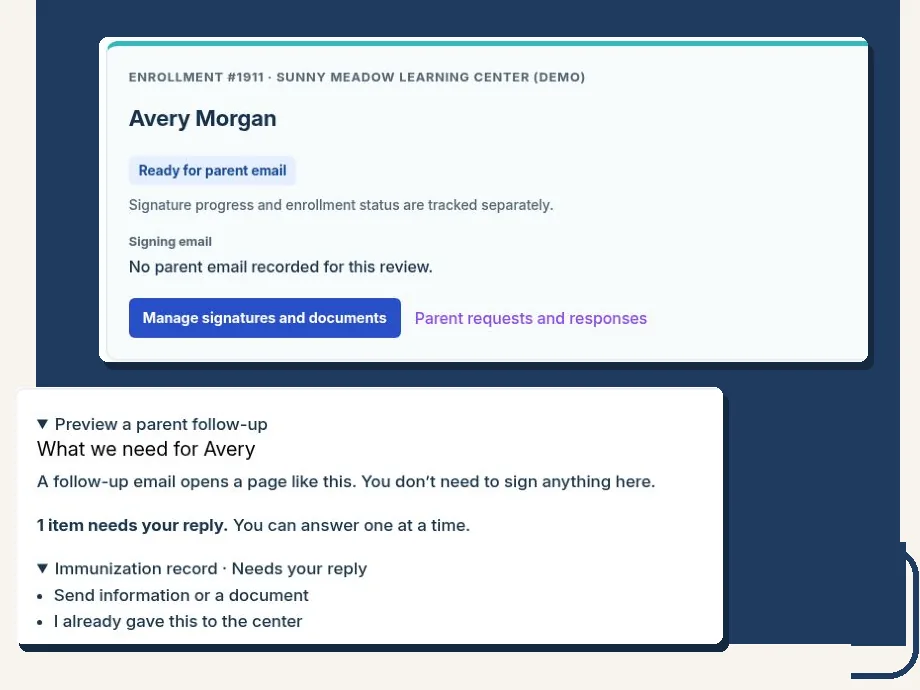
The separate childcare portal brings enrollment, parent contacts, documents, PDFs, signatures, corrections, and staff review together, with access based on each facility.
The public demo uses sample records to show how directors, WPMG staff, and parents use the portal.
- Related records
- Parent contacts can be associated with the appropriate child records without repeating or fragmenting the relationship.
- Role-aware access
- Providers and staff see the records and tools they need for their facility and role.
- Documents and signatures
- PDFs, uploaded evidence, signatures, corrections, and review remain connected to the right workflow.
- State and communication
- Status controls what happens next and supports timely notices to the people involved.
- Migration and safeguards
- Test the move first, review records that don’t match, and check the results before completing it. Keep a way to recover the original data.
The systems-minded pattern
-
People and roles
Identify who participates, what each person is responsible for, and where access must differ.
-
Records and relationships
Define what must remain connected and what must stay separate.
-
States and exceptions
Model not only the ordinary path but also corrections, incomplete information, reassignment, and review.
-
Evidence and communication
Keep documents, receipts, signatures, reports, messages, and history attached to the work they explain.
-
Oversight and recovery
Support verification, reporting, migration review, and correction without treating the system as infallible.
-
Continuing responsibility
Maintain documentation, support active systems, and adapt the implementation when the operation changes.
The reusable asset is not a generic template. It is the discipline required to understand the operation before building around it.
Start with the process that needs help
Tell us who does the work, what information they use, and where things get stuck. We’ll help you work out whether you need a better workflow, a portal, an integration, or a new application.